
FAQ: Difference between revisions
No edit summary |
(this page used to be a defense of why plover is not supplanting existing steno software and a proof of why steno not dvorak. that's not priority) |
||
| Line 1: | Line 1: | ||
{{Cleanup}} | {{Cleanup}} | ||
== | == General == | ||
===How do I use Plover?=== | |||
The [[Beginner's Guide]] has everything you need to get started, including how to install Plover, what hardware you need, and how to practice and learn. | |||
===How do I install Plover?=== | |||
See the [[Installation Guide]]. | |||
=== What hardware do I need? === | |||
{{See also|Supported hardware}} | |||
You can get started and try Plover out on the keyboard you are using right now. | |||
You can also consider a dedicated hobbyist writer that is designed and optimized for stenography. The list of [[supported hardware]] is a good starting point. | |||
If you have a traditional stenography machine, Plover is also [[Setting up your writer with Plover|compatible with those]]. | |||
=== Can I use my Luminex/Stentura/Lightspeed/other stenotype machine? === | |||
{{See also|Setting up your writer with Plover}} | |||
Yes! See the [[Supported Hardware#Stenotype Machines|stenotype machine section in supported hardware]] for machines that have been confirmed to work with Plover, and any specific setup instructions you may need to follow. | |||
=== Can I use my dictionaries from another program? === | |||
{{See also|Dictionary format}} | |||
Yes, Plover supports the RTF/CRE format, which is exportable from just about any CAT software. | |||
===It's not working, I need help.=== | |||
See [[Troubleshooting issues]]. | |||
== Stenography == | |||
=== What is stenography? === | === What is stenography? === | ||
<youtube>62l64Acfidc</youtube> | <youtube>62l64Acfidc</youtube> | ||
Stenography is a form of shorthand writing/typing, usually done on a special machine (although with Plover, you can use computer keyboard that has n-key rollover). It was invented in the early 1900s. | Stenography is a form of shorthand writing/typing, usually done on a special machine (although with [[Plover software|Plover]], you can use computer keyboard that has n-key rollover). It was invented in the early 1900s. | ||
Professionals use stenography to keep up with the rate of human speech and write every word verbatim. Hobbyists and amateurs use stenography for various goals, such as faster typing speed, ergonomics, or pure interest. | |||
=== How fast can stenographers write? === | === How fast can stenographers write? === | ||
| Line 18: | Line 44: | ||
|30 WPM | |30 WPM | ||
|- | |- | ||
|Average Typist | |Average QWERTY Typist | ||
|40 WPM | |40 WPM | ||
|- | |- | ||
|Fast Typist | |Fast QWERTY Typist | ||
|120 WPM | |120 WPM | ||
|- | |- | ||
|Fastest | |Amateur Stenographer | ||
|160 WPM | |||
|- | |||
|Fastest QWERTY Typists | |||
|200 WPM | |200 WPM | ||
|- | |- | ||
|Average Speech | |Average Speech | ||
|200 WPM | |200 WPM | ||
|- | |- | ||
|Professional Stenographer | |Professional Stenographer | ||
| Line 42: | Line 65: | ||
|370 WPM | |370 WPM | ||
|} | |} | ||
Experienced professional stenographers can transcribe spoken English at up to 300 words per minute for sustained periods of time (longer than a minute). By comparison, the fastest typists are limited to around 230 words per minute for texts with comparable material (though, shorter in length). With practice, amateur steno users can reach 160+ words per minute. | |||
(Also see: [[FAQ#How long does it take to learn?|How long does it take to learn?]]) | |||
=== Will stenography be replaced by automatic voice recognition or AI? === | |||
[[Mirabai Knight]] has done [https://www.youtube.com/watch?v=XKe1O7ppyqQ a presentation] on this topic. As a summary, automatic voice recognition is still not accurate enough in certain situations such as if there is bad audio, someone speaking with a non-standard accent, or if the cost of certain mistakes is too high. Especially for events with multiple speakers, a lot of equipment is needed just to record audio (quality microphones for each speaker, mixers, etc). Additionally, an audio engineer is still required to monitor the audio and ensure everyone's microphone is working properly. For many situations, having a stenographer present is the easier solution. | |||
[[Stanley Sakai]] has an [https://medium.com/swlh/in-an-age-of-high-definition-digital-audio-why-do-we-still-use-human-stenographers-60ca91a65f39 in depth article] covering the recording issue in more detail. | |||
==Plover== | |||
=== What is Plover? === | === What is Plover? === | ||
Plover is a 100% free, open source steno program that lets you use your keyboard as a steno machine. It is a small Python application that you run in the background. It translates the steno strokes to text (by emulating keyboard presses), so you can use steno with any computer program. | Plover is a 100% free, open source steno program that lets you use your keyboard as a steno machine. It is a small Python application that you run in the background. It translates the steno strokes to text (by emulating keyboard presses), so you can use steno with any computer program. | ||
| Line 51: | Line 80: | ||
Plover is available on Windows, Mac and Linux. To get started, follow the [[Beginner's Guide]]. | Plover is available on Windows, Mac and Linux. To get started, follow the [[Beginner's Guide]]. | ||
=== Why "Plover"? === | === Why the name "Plover"? === | ||
The short answer is that it's a two-syllable, six-letter word that can be written in a single stroke on a steno machine. The longer answer is [http://plover.stenoknight.com/2010/03/why-plover.html here]. | The short answer is that it's a two-syllable, six-letter word that can be written in a single stroke on a steno machine. The longer answer is [http://plover.stenoknight.com/2010/03/why-plover.html here]. | ||
=== What does using Plover look like? === | === What does using Plover look like? === | ||
| Line 103: | Line 101: | ||
|[https://www.youtube.com/watch?v=q7g0ml60LGY <img src="https://i.ytimg.com/vi/q7g0ml60LGY/hqdefault.jpg" alt="Rails 7: The Steno Demo" />][https://www.youtube.com/watch?v=q7g0ml60LGY <br/>(click to view video — 2:08:59)] | |[https://www.youtube.com/watch?v=q7g0ml60LGY <img src="https://i.ytimg.com/vi/q7g0ml60LGY/hqdefault.jpg" alt="Rails 7: The Steno Demo" />][https://www.youtube.com/watch?v=q7g0ml60LGY <br/>(click to view video — 2:08:59)] | ||
|} | |} | ||
=== Where can I find other people who use Plover? === | === Where can I find other people who use Plover? === | ||
| Line 137: | Line 106: | ||
=== How can I help? === | === How can I help? === | ||
[[Open Steno]] is run by volunteers. | |||
You can help by: | You can help by: | ||
| Line 143: | Line 112: | ||
* [https://github.com/openstenoproject/plover/blob/master/CONTRIBUTING.md#contributing-code Contributing code] | * [https://github.com/openstenoproject/plover/blob/master/CONTRIBUTING.md#contributing-code Contributing code] | ||
* [https://github.com/openstenoproject/plover/blob/master/CONTRIBUTING.md#reporting-issues Reporting issues] | * [https://github.com/openstenoproject/plover/blob/master/CONTRIBUTING.md#reporting-issues Reporting issues] | ||
* [[ | * [[Help:Editing|Editing this wiki]] | ||
* [[The Steno Community|Getting involved in the community]] | * [[The Steno Community|Getting involved in the community]] | ||
* [https://www.openstenoproject.org/donate/ Donating money] | * [https://www.openstenoproject.org/donate/ Donating money] | ||
* Telling people about Open Steno, Plover, and stenography | * Telling people about Open Steno, Plover, and stenography | ||
== Using Plover == | == Using Plover == | ||
=== Do I need a professional machine to learn steno? === | |||
No, you can learn with the computer keyboard you already have. | |||
Most professional stenographers use professional machines, but [[Mirabai Knight]] uses "hobbyist" writers in her professional life, such as the Jarne, Georgi, and more.<sup>[http://plover.stenoknight.com/2019/12/georgi-review.html]</sup> | |||
=== Can I use Plover for normal computer use? === | === Can I use Plover for normal computer use? === | ||
Yes! Plover can send nearly every keyboard key or combination you like. See the [[Dictionary Format|dictionary format]] for more information. | Yes! Plover can send nearly every keyboard key or combination you like. See the [[Dictionary Format|dictionary format]] for more information. | ||
Since there are many symbols and modifiers and not all of these are defined in the default Plover dictionaries, you may be interested in some dictionaries and plugins other people have made: | Since there are many symbols and modifiers and not all of these are defined in the default Plover dictionaries, you may be interested in some dictionaries and plugins other people have made: | ||
| Line 188: | Line 134: | ||
=== Can I use Plover for programming? === | === Can I use Plover for programming? === | ||
Yes, and many people do! That being said, it | {{See also|Coding with steno}} | ||
Yes, and many people do! That being said, it requires time investment to learn, and makes sense mostly for the ergonomic benefit only. | |||
For example: | For example: | ||
* Community member [[Thea Morin]] programming with steno: [https://www.youtube.com/watch?v=RBBiri3CD6w Coding in Stenography, Quick Demo], [https://www.youtube.com/watch?v=711T2simRyI Raw unedited steno coding demo] | |||
* | |||
* [https://www.paulfioravanti.com/ Paul Fioravanti] recreated DHH's rails 7 demo using steno: [https://www.youtube.com/watch?v=q7g0ml60LGY Rails 7: The Steno Demo] | * [https://www.paulfioravanti.com/ Paul Fioravanti] recreated DHH's rails 7 demo using steno: [https://www.youtube.com/watch?v=q7g0ml60LGY Rails 7: The Steno Demo] | ||
* Mirabai Knight | * [[Mirabai Knight]] demos [https://www.youtube.com/watch?v=jRFKZGWrmrM transcribing some of Plover's python source code] | ||
=== Can I use Plover for languages other than English? === | |||
Yes, with the use of custom systems, it's possible to use Plover to type in [[Steno Layouts and Supported Languages|other languages]]. | |||
Currently, access to learning resources for other languages is limited, so it is usually advised that you learn the English system first so that you get a good understanding of stenography before learning another system. | |||
Reading channel history in the languages area of the Plover Discord is currently one of the best places to find more information. | |||
Plover | |||
=== How long does it take to learn? === | |||
Stenography consists mainly of two phases: learning theory, and speedbuilding. | |||
Most people are able to finish learning theory within anywhere from 2 months to 6 months. It is common to type at speeds of 10wpm-60wpm after completing theory. | |||
Progress in theory and speed is highly dependent on the amount of practice you put in. For those who aim to match or exceed their QWERTY typing speed, it depends on what your original speed was. Many people take a total of 6 to 18 months to reach speeds comparable to their QWERTY speed. For more statistics, read the [[Open Steno Community Survey]] results. | |||
With more or less practice, these numbers can be much less or much more. | |||
Training in stenography schools, which is completed at 225wpm, is typically advertised to take 2 years, but the average time to complete a program is closer to 3 or 4 years. The most talented students have taken 1.2 to 1.5 years. | |||
=== What's a brief/stroke/arpeggiating/etc.? === | === What's a brief/stroke/arpeggiating/etc.? === | ||
| Line 233: | Line 166: | ||
For general information on what Plover cannot do, see the open feature requests. If there's something you'd like Plover to do that it currently doesn't, you can open a feature request of your own. | For general information on what Plover cannot do, see the open feature requests. If there's something you'd like Plover to do that it currently doesn't, you can open a feature request of your own. | ||
Plover is not court reporting (CAT) software, and there are no plans to make it into CAT replacement software. It has no transcript preparation utilities of any kind. For example: document approval and delivery workflow, document encryption, or file management. | |||
(Also see: [[FAQ#Is Plover going to put CAT software companies out of business?|Is Plover going to put CAT software companies out of business?]]) | |||
=== How do I write a word that's not in my dictionary? === | |||
You can use fingerspelling, which is a letter-by-letter spelling technique. If you use this word often enough, you should add it to your dictionary after. | |||
==Comparisons to other typing systems== | |||
=== How does stenography compare to typing? === | |||
Typing is (usually) data entry with single fingers. Most people use a QWERTY or Dvorak keyboard layout to type everything out character by character. | |||
Stenography is chorded data entry, using multiple fingers. Stenographers use keyboard "chords" to type syllables, words, or entire phrases. You press groups of keys, and lift off, rather than pressing down individual keys one after the other. Plover — and all steno systems — express words primarily as groups of sounds rather than groups of letters of the alphabet. | |||
=== How does steno compare to alternative layouts like Dvorak and Colemak? === | |||
In terms of speed, professional stenographers are typically certify at 225wpm, and [https://youtu.be/nETlhthG22Q the world record is 370wpm]. Audiobooks are narrated at around 150wpm<sup>[https://help.acx.com/s/article/how-long-will-my-narrated-audiobook-be]</sup>. Barbara Blackburn, arguably one of the fastest Dvorak typists, has achieved a peak speed of 212wpm on Dvorak. | |||
In terms of comfort, many people say than stenography is more ergonomic. [[Mirabai Knight|Knight]] has written an [http://plover.stenoknight.com/2010/05/ergonomic-argument.html article on the ergonomic argument for stenography]. | |||
=== If I learn steno, will it make using QWERTY harder? === | |||
If you have used alternative layouts like Dvorak and Colemak, you might have found that learning one would make it harder to use QWERTY (e.g. needing time to warm up when changing layouts, losing speed). | |||
Plover | Most Plover community members report not experiencing this with steno in the same way. | ||
=== Why | === Why isn't steno more popular than QWERTY? === | ||
There are a number of possible reasons: | |||
# Stenography was copyrighted for many decades, which limited the amount of competition in the marketplace. | |||
# The vendors decided to focus on high value products in market sectors where organizations would be willing to pay higher prices. Professional hardware and software can cost several thousands of dollars. | |||
# It takes longer to learn how to write with steno than it does to learn how to type. (See [[FAQ#How long does it take to learn?|How long does it take to learn?]]) | |||
# Plover software, and [[Supported Hardware|suitable low cost hardware]], didn't exist until recently. | |||
# Stenography is not mainstream. It is a niche profession that most people have never heard of. | |||
== Comparisons to professional stenography == | == Comparisons to professional stenography == | ||
| Line 253: | Line 204: | ||
Without a steady supply of amateurs to hold the ranks, it's difficult for professionals to exist. Many legendary musicians started out with a $50 guitar and a tattered songbook. If every guitar cost $5,000 and the only way to learn how to play it was at a conservatory, how many potentially great guitarists would never even get within strumming range? Plover reduces the $1,500+ initial startup cost of steno to around $70, which means vastly more people can give it a try and see if it might be for them. | Without a steady supply of amateurs to hold the ranks, it's difficult for professionals to exist. Many legendary musicians started out with a $50 guitar and a tattered songbook. If every guitar cost $5,000 and the only way to learn how to play it was at a conservatory, how many potentially great guitarists would never even get within strumming range? Plover reduces the $1,500+ initial startup cost of steno to around $70, which means vastly more people can give it a try and see if it might be for them. | ||
=== How is Plover different from commercial steno programs? === | === How is Plover different from commercial steno programs? === | ||
| Line 270: | Line 211: | ||
=== Is Plover going to put CAT software companies out of business? === | === Is Plover going to put CAT software companies out of business? === | ||
No, Plover is not court reporting software. It has no transcript preparation utilities of any kind. However, it might prove useful to people who use other CAT systems for their work but would like to use Plover as a replacement for their qwerty keyboard in daily computing tasks. At some point Plover might become a solid option for CART providers, but there are no plans to make it into CAT replacement software for either court reporters or broadcast captioners. | |||
=== What are some features in Plover not commonly found in most CAT software? === | === What are some features in Plover not commonly found in most CAT software? === | ||
# Plover's main purpose is to replace the | # Plover's main purpose is to replace the QWERTY keyboard with a steno keyboard. Unlike other CAT systems, it does not have a text entry window; it's a pure conduit straight to the operating system. Anything you can do with a qwerty keyboard can be done with Plover, and you can use it with the word processor or text editor of your choice. | ||
# Plover runs on Windows, Mac, and Linux. | # Plover runs on Windows, Mac, and Linux. | ||
# Its length-based buffer, as opposed to the time-based buffer used in most CAT software, ensures instant delivery of text with no buffer flushing or time delay. | # Its length-based buffer, as opposed to the time-based buffer used in most CAT software, ensures instant delivery of text with no buffer flushing or time delay. | ||
| Line 282: | Line 223: | ||
<youtube>eSU5JlVXT1A</youtube> | <youtube>eSU5JlVXT1A</youtube> | ||
[[Category:Stenography]] | [[Category:Stenography]] | ||
Latest revision as of 17:40, 20 March 2026

This page needs clean-up. The information may be complete, but help revise the page by removing first-person speech, breaking up large blocks of text, adding inter-wiki links, and making information more concise and easy-to-read.
General
How do I use Plover?
The Beginner's Guide has everything you need to get started, including how to install Plover, what hardware you need, and how to practice and learn.
How do I install Plover?
See the Installation Guide.
What hardware do I need?
- See also: Supported hardware
You can get started and try Plover out on the keyboard you are using right now.
You can also consider a dedicated hobbyist writer that is designed and optimized for stenography. The list of supported hardware is a good starting point.
If you have a traditional stenography machine, Plover is also compatible with those.
Can I use my Luminex/Stentura/Lightspeed/other stenotype machine?
- See also: Setting up your writer with Plover
Yes! See the stenotype machine section in supported hardware for machines that have been confirmed to work with Plover, and any specific setup instructions you may need to follow.
Can I use my dictionaries from another program?
- See also: Dictionary format
Yes, Plover supports the RTF/CRE format, which is exportable from just about any CAT software.
It's not working, I need help.
Stenography
What is stenography?
Stenography is a form of shorthand writing/typing, usually done on a special machine (although with Plover, you can use computer keyboard that has n-key rollover). It was invented in the early 1900s.
Professionals use stenography to keep up with the rate of human speech and write every word verbatim. Hobbyists and amateurs use stenography for various goals, such as faster typing speed, ergonomics, or pure interest.
How fast can stenographers write?
| Method | Typical Speed |
|---|---|
| Handwriting | 30 WPM |
| Average QWERTY Typist | 40 WPM |
| Fast QWERTY Typist | 120 WPM |
| Amateur Stenographer | 160 WPM |
| Fastest QWERTY Typists | 200 WPM |
| Average Speech | 200 WPM |
| Professional Stenographer | 225 WPM |
| Steno World Record | 370 WPM |
Experienced professional stenographers can transcribe spoken English at up to 300 words per minute for sustained periods of time (longer than a minute). By comparison, the fastest typists are limited to around 230 words per minute for texts with comparable material (though, shorter in length). With practice, amateur steno users can reach 160+ words per minute.
(Also see: How long does it take to learn?)
Will stenography be replaced by automatic voice recognition or AI?
Mirabai Knight has done a presentation on this topic. As a summary, automatic voice recognition is still not accurate enough in certain situations such as if there is bad audio, someone speaking with a non-standard accent, or if the cost of certain mistakes is too high. Especially for events with multiple speakers, a lot of equipment is needed just to record audio (quality microphones for each speaker, mixers, etc). Additionally, an audio engineer is still required to monitor the audio and ensure everyone's microphone is working properly. For many situations, having a stenographer present is the easier solution.
Stanley Sakai has an in depth article covering the recording issue in more detail.
Plover
What is Plover?
Plover is a 100% free, open source steno program that lets you use your keyboard as a steno machine. It is a small Python application that you run in the background. It translates the steno strokes to text (by emulating keyboard presses), so you can use steno with any computer program.
Plover is available on Windows, Mac and Linux. To get started, follow the Beginner's Guide.
Why the name "Plover"?
The short answer is that it's a two-syllable, six-letter word that can be written in a single stroke on a steno machine. The longer answer is here.
What does using Plover look like?
| QWERTY versus Stenography on Steno Arcade | Plover wins the race! | Demonstration of Plover with Qwerty Keyboard |
|---|---|---|
 (click to view video — 3:25) |
 (click to view video — 0:30) |
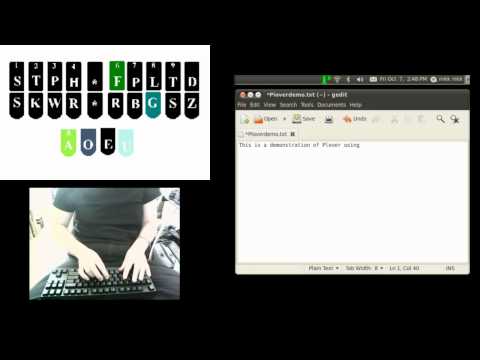 (click to view video — 1:05) |
| Realtime Text to Speech with Plover | Coding in Stenography, Quick Demo | Rails 7: The Steno Demo |
 (click to view video — 3:36) |
 (click to view video — 2:00) |
 (click to view video — 2:08:59) |
Where can I find other people who use Plover?
Check out these links to the community.
How can I help?
Open Steno is run by volunteers.
You can help by:
- Contributing code
- Reporting issues
- Editing this wiki
- Getting involved in the community
- Donating money
- Telling people about Open Steno, Plover, and stenography
Using Plover
Do I need a professional machine to learn steno?
No, you can learn with the computer keyboard you already have.
Most professional stenographers use professional machines, but Mirabai Knight uses "hobbyist" writers in her professional life, such as the Jarne, Georgi, and more.[1]
Can I use Plover for normal computer use?
Yes! Plover can send nearly every keyboard key or combination you like. See the dictionary format for more information.
Since there are many symbols and modifiers and not all of these are defined in the default Plover dictionaries, you may be interested in some dictionaries and plugins other people have made:
- Emily Symbols, for typing symbols (including those not in the main Plover dictionary)
- Emily Modifiers, for typing with modifiers (e.g. ALT+D, CTRL+-, SUPER, SHIFT+F5)
- Abby's Left Hand Modifiers, for typing with modifiers but keeping the right hand free
- Plover Emoji, for typing emoji
Can I use Plover for programming?
- See also: Coding with steno
Yes, and many people do! That being said, it requires time investment to learn, and makes sense mostly for the ergonomic benefit only.
For example:
- Community member Thea Morin programming with steno: Coding in Stenography, Quick Demo, Raw unedited steno coding demo
- Paul Fioravanti recreated DHH's rails 7 demo using steno: Rails 7: The Steno Demo
- Mirabai Knight demos transcribing some of Plover's python source code
Can I use Plover for languages other than English?
Yes, with the use of custom systems, it's possible to use Plover to type in other languages.
Currently, access to learning resources for other languages is limited, so it is usually advised that you learn the English system first so that you get a good understanding of stenography before learning another system.
Reading channel history in the languages area of the Plover Discord is currently one of the best places to find more information.
How long does it take to learn?
Stenography consists mainly of two phases: learning theory, and speedbuilding.
Most people are able to finish learning theory within anywhere from 2 months to 6 months. It is common to type at speeds of 10wpm-60wpm after completing theory.
Progress in theory and speed is highly dependent on the amount of practice you put in. For those who aim to match or exceed their QWERTY typing speed, it depends on what your original speed was. Many people take a total of 6 to 18 months to reach speeds comparable to their QWERTY speed. For more statistics, read the Open Steno Community Survey results.
With more or less practice, these numbers can be much less or much more.
Training in stenography schools, which is completed at 225wpm, is typically advertised to take 2 years, but the average time to complete a program is closer to 3 or 4 years. The most talented students have taken 1.2 to 1.5 years.
What's a brief/stroke/arpeggiating/etc.?
You can find a list of commonly used terms in the glossary.
What can't Plover do?
For general information on what Plover cannot do, see the open feature requests. If there's something you'd like Plover to do that it currently doesn't, you can open a feature request of your own.
Plover is not court reporting (CAT) software, and there are no plans to make it into CAT replacement software. It has no transcript preparation utilities of any kind. For example: document approval and delivery workflow, document encryption, or file management.
(Also see: Is Plover going to put CAT software companies out of business?)
How do I write a word that's not in my dictionary?
You can use fingerspelling, which is a letter-by-letter spelling technique. If you use this word often enough, you should add it to your dictionary after.
Comparisons to other typing systems
How does stenography compare to typing?
Typing is (usually) data entry with single fingers. Most people use a QWERTY or Dvorak keyboard layout to type everything out character by character.
Stenography is chorded data entry, using multiple fingers. Stenographers use keyboard "chords" to type syllables, words, or entire phrases. You press groups of keys, and lift off, rather than pressing down individual keys one after the other. Plover — and all steno systems — express words primarily as groups of sounds rather than groups of letters of the alphabet.
How does steno compare to alternative layouts like Dvorak and Colemak?
In terms of speed, professional stenographers are typically certify at 225wpm, and the world record is 370wpm. Audiobooks are narrated at around 150wpm[2]. Barbara Blackburn, arguably one of the fastest Dvorak typists, has achieved a peak speed of 212wpm on Dvorak.
In terms of comfort, many people say than stenography is more ergonomic. Knight has written an article on the ergonomic argument for stenography.
If I learn steno, will it make using QWERTY harder?
If you have used alternative layouts like Dvorak and Colemak, you might have found that learning one would make it harder to use QWERTY (e.g. needing time to warm up when changing layouts, losing speed).
Most Plover community members report not experiencing this with steno in the same way.
Why isn't steno more popular than QWERTY?
There are a number of possible reasons:
- Stenography was copyrighted for many decades, which limited the amount of competition in the marketplace.
- The vendors decided to focus on high value products in market sectors where organizations would be willing to pay higher prices. Professional hardware and software can cost several thousands of dollars.
- It takes longer to learn how to write with steno than it does to learn how to type. (See How long does it take to learn?)
- Plover software, and suitable low cost hardware, didn't exist until recently.
- Stenography is not mainstream. It is a niche profession that most people have never heard of.
Comparisons to professional stenography
Why does steno need amateurs?
In most skill-based fields — music, photography, athletics, and computer programming, to name a few — a healthy pool of amateurs makes it possible for professionals to exist. People cultivate an interest, buy some cheap equipment, take a few classes, discover that they love the work, hone their skills with thousands of hours of practice, and eventually a very dedicated and talented few are able to become good enough to make a living at what they love. The rest do it without compensation, just for their own pleasure and enjoyment. This is the natural ecosystem of any difficult skill: A wide base of dabblers and dilettantes at the bottom, and a small number of world class hotshots at the top.
Without a steady supply of amateurs to hold the ranks, it's difficult for professionals to exist. Many legendary musicians started out with a $50 guitar and a tattered songbook. If every guitar cost $5,000 and the only way to learn how to play it was at a conservatory, how many potentially great guitarists would never even get within strumming range? Plover reduces the $1,500+ initial startup cost of steno to around $70, which means vastly more people can give it a try and see if it might be for them.
How is Plover different from commercial steno programs?
Well, first off, it's free. Free to distribute, free to modify. No dongles, no upgrade fees, no constraints. That's already a $4,000 difference.
To the developer's knowledge, it's also the only steno software that works on a buffer-based system rather than a timer-based system, and that has direct access to the OS rather than filtering everything into a steno-specific word processor. This means it's lightweight, powerful, and doesn't require a 1.5-second wait time between when a stroke is entered and when the translation appears in an external program. In Plover, the translation appears instantly, and the software isn't cluttered up with file managers, printer handlers, and other court-reporting flimflam that an amateur stenographer will never use. Instead, it's a direct conduit between the steno keyboard and the OS. Plover can do everything a qwerty keyboard can do – but much, much faster.
Is Plover going to put CAT software companies out of business?
No, Plover is not court reporting software. It has no transcript preparation utilities of any kind. However, it might prove useful to people who use other CAT systems for their work but would like to use Plover as a replacement for their qwerty keyboard in daily computing tasks. At some point Plover might become a solid option for CART providers, but there are no plans to make it into CAT replacement software for either court reporters or broadcast captioners.
What are some features in Plover not commonly found in most CAT software?
- Plover's main purpose is to replace the QWERTY keyboard with a steno keyboard. Unlike other CAT systems, it does not have a text entry window; it's a pure conduit straight to the operating system. Anything you can do with a qwerty keyboard can be done with Plover, and you can use it with the word processor or text editor of your choice.
- Plover runs on Windows, Mac, and Linux.
- Its length-based buffer, as opposed to the time-based buffer used in most CAT software, ensures instant delivery of text with no buffer flushing or time delay.
- Its dictionary is text-based, so you can search through and edit it using any text editor. Updating the dictionary from the writer is smooth and seamless.
- And, of course, its biggest feature: It's 100% free and open source. You can download it, keep it on a USB key, and have it to hand as a backup in case something happens to your CAT software. You can distribute it to interested friends and potential steno students. You can run it on as many computers as you like, with absolutely no restrictions. And, if you know how to program in Python, you can modify it and change it to your heart's delight.